GIFtoolsCookbook
1. Quick-start guide
2. Installation
3. Basic Functionality
4. Object Functionality
4.1. Data
4.2. Mesh
4.2.1. Modifying a Tensor mesh
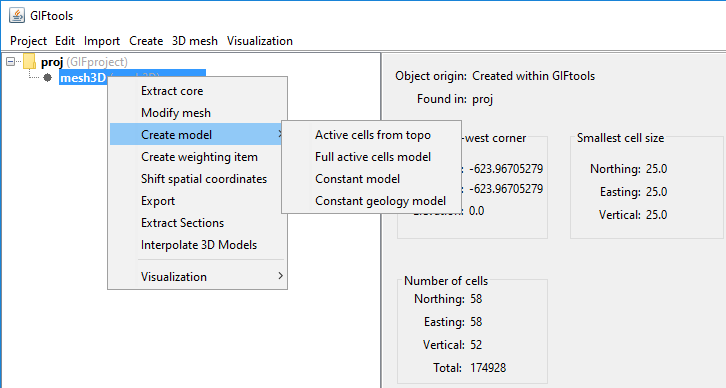
4.2.2. Create Model
4.2.2.1. Create a constant model
4.2.2.2. Create an active cells model
4.2.3. Create Weights
4.2.4. Shift Mesh Coordinates
4.2.5. Refine an ocTree mesh from topography
4.2.6. View in 3D
4.2.7. Export
4.2.8. Extract Sections
4.2.9. Interpolate 3D Models
4.3. Model
4.4. Images
4.5. Weights
4.6. Workflow
4.7. Forward Modeling
4.8. Inversion
4.9. Processing
4.10. Fortran Utility Program
4.11. Survey
4.12. Model Builder Module
5. UBC File formats
6. Fundamentals of Inversions
7. Coordinates, Sign Conventions and Units: A Quick Guide
8. Recipes
9. A to Z Examples
10. Comprehensive Workflows
11. Video Tutorials
Site map
1. Quick-start guide
2. Installation
3. Basic Functionality
4. Object Functionality
4.1. Data
4.2. Mesh
4.2.1. Modifying a Tensor mesh
4.2.2. Create Model
4.2.3. Create Weights
4.2.4. Shift Mesh Coordinates
4.2.5. Refine an ocTree mesh from topography
4.2.6. View in 3D
4.2.7. Export
4.2.8. Extract Sections
4.2.9. Interpolate 3D Models
4.3. Model
4.4. Images
4.5. Weights
4.6. Workflow
4.7. Forward Modeling
4.8. Inversion
4.9. Processing
4.10. Fortran Utility Program
4.11. Survey
4.12. Model Builder Module
5. UBC File formats
6. Fundamentals of Inversions
7. Coordinates, Sign Conventions and Units: A Quick Guide
8. Recipes
9. A to Z Examples
10. Comprehensive Workflows
11. Video Tutorials
GIFtoolsCookbook
Docs
»
4.
Object Functionality
»
4.2.
Mesh
»
4.2.2.
Create Model
GIF Documentation
Edit on GitHub
4.2.2.
Create Model
4.2.2.1. Create a constant model
4.2.2.2. Create an active cells model