GIFtoolsCookbook
  • 1. Quick-start guide
  • 2. Installation
  • 3. Basic Functionality
  • 4. Object Functionality
    • 4.1. Data
    • 4.2. Mesh
    • 4.3. Model
    • 4.4. Images
    • 4.5. Weights
    • 4.6. Workflow
    • 4.7. Forward Modeling
    • 4.8. Inversion
      • 4.8.1. Set the working directory
      • 4.8.2. Edit Options
        • 4.8.2.1. Gravity Inversions
        • 4.8.2.2. Magnetic Inversions
        • 4.8.2.3. DCIP
        • 4.8.2.4. EM1DFM Inversions
        • 4.8.2.5. EM1DTM Inversions
        • 4.8.2.6. Frequency Domain EM
        • 4.8.2.7. Time Domain EM
        • 4.8.2.8. Natural Source EM (MT and ZTEM)
      • 4.8.3. Sensitivity weights for DCIP3D
      • 4.8.4. Write files
      • 4.8.5. Run
      • 4.8.6. Load results
      • 4.8.7. View results
      • 4.8.8. Copy the item
    • 4.9. Processing
    • 4.10. Fortran Utility Program
    • 4.11. Survey
    • 4.12. Model Builder Module
  • 5. UBC File formats
  • 6. Fundamentals of Inversions
  • 7. Coordinates, Sign Conventions and Units: A Quick Guide
  • 8. Recipes
  • 9. A to Z Examples
  • 10. Comprehensive Workflows
  • 11. Video Tutorials
  • Site map
    • 1. Quick-start guide
    • 2. Installation
    • 3. Basic Functionality
    • 4. Object Functionality
      • 4.1. Data
      • 4.2. Mesh
      • 4.3. Model
      • 4.4. Images
      • 4.5. Weights
      • 4.6. Workflow
      • 4.7. Forward Modeling
      • 4.8. Inversion
        • 4.8.1. Set the working directory
        • 4.8.2. Edit Options
        • 4.8.3. Sensitivity weights for DCIP3D
        • 4.8.4. Write files
        • 4.8.5. Run
        • 4.8.6. Load results
        • 4.8.7. View results
        • 4.8.8. Copy the item
      • 4.9. Processing
      • 4.10. Fortran Utility Program
      • 4.11. Survey
      • 4.12. Model Builder Module
    • 5. UBC File formats
    • 6. Fundamentals of Inversions
    • 7. Coordinates, Sign Conventions and Units: A Quick Guide
    • 8. Recipes
    • 9. A to Z Examples
    • 10. Comprehensive Workflows
    • 11. Video Tutorials
GIFtoolsCookbook
  • Docs »
  • 4. Object Functionality »
  • 4.8. Inversion »
  • 4.8.2. Edit Options for Inversion Objects
  • GIF Documentation Edit on GitHub

4.8.2. Edit Options for Inversion Objects

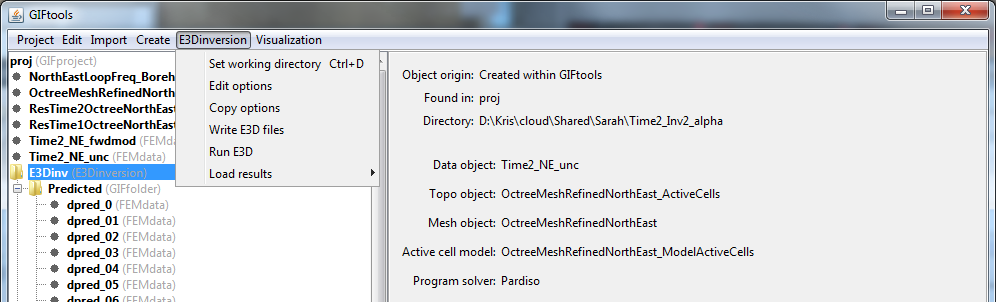
The edit options functionality is responsible for setting all parameters and objects used in the inversion. This includes setting the mesh, data, topography, bounds, regularization being used and methods used to compute the trade-off parameter. To set the inversion parameters through edit options, click the inversion object and select:

[Inversion class] → Edit options
../../../../_images/simpleInvMenu.png

The options for each inversion type are organized as follows:

  • 4.8.2.1. Gravity Inversions
    • 4.8.2.1.1. Grav3D Inversion
  • 4.8.2.2. Magnetic Inversions
    • 4.8.2.2.1. Mag and Mag Amplitude Inversion (Mag3D)
    • 4.8.2.2.2. MVI Inversion
  • 4.8.2.3. DCIP
    • 4.8.2.3.1. DCIP2D
    • 4.8.2.3.2. DCIP3D v5.5
    • 4.8.2.3.3. DCIP Octree
  • 4.8.2.4. EM1DFM Inversions
    • 4.8.2.4.1. Global Tab
    • 4.8.2.4.2. Conductivity and Susceptibility Tabs
    • 4.8.2.4.3. Inversion Mode
    • 4.8.2.4.4. Plotting 1D Models on a 3D Mesh
  • 4.8.2.5. EM1DTM Inversions
    • 4.8.2.5.1. Global Tab
    • 4.8.2.5.2. Conductivity and Susceptibility Tabs
    • 4.8.2.5.3. Inversion Mode
  • 4.8.2.6. Frequency Domain EM
    • 4.8.2.6.1. E3D/E3DRH v1
    • 4.8.2.6.2. E3D/E3DRH v2 (and v2 tiled)
  • 4.8.2.7. Time Domain EM
    • 4.8.2.7.1. H3DTD v1 and v2
    • 4.8.2.7.2. TDoctree v1 (and v1 tiled)
    • 4.8.2.7.3. TDoctree v2 and TDRH v2
  • 4.8.2.8. Natural Source EM (MT and ZTEM)
    • 4.8.2.8.1. E3DMT version 1
    • 4.8.2.8.2. E3DMT version 2
Previous Next

© Copyright 2015-2017, UBC-GIF.

GIF Documentation Home   |   Contact